

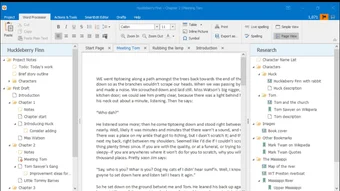

Description
Download SmartEdit Writer – Free Windows Literary Text Editor
Overview
SmartEdit Writer is a purpose‑built literary text editor designed specifically for novelists, short‑story writers, and anyone who creates fiction on the Windows platform. While many writers default to generic word processors such as Microsoft Word or Google Docs, SmartEdit Writer offers a focused environment that mirrors the workflow of classic literature creation. The interface feels familiar to anyone who has used a traditional desktop editor, yet every pane, button, and shortcut has been fine‑tuned for storytelling. On the left side, an intuitive index provides quick navigation through chapters, scenes, and character sheets, while the right pane serves as a dedicated space for annotations, research snippets, and writer’s notes. This dual‑panel layout eliminates the constant context‑switching that plagues writers who juggle separate documents for outlines, drafts, and research. Moreover, SmartEdit Writer is completely free, which means authors can access professional‑grade tools without worrying about subscription fees or hidden costs. The software’s primary goal is to let writers stay in the zone: you can create and edit chapters, manage a growing cast of characters, and keep track of plot threads without leaving the application. By integrating a multilingual name finder that pulls from English, German, Spanish, French, and Irish name databases, SmartEdit Writer also helps writers inject cultural authenticity into their narratives with just a few clicks. In short, it is a secure, lightweight, and feature‑rich solution that brings the discipline of classic literature editing into the modern Windows desktop.
Core Features that Set SmartEdit Writer Apart
- Dedicated Character Sheets: Create, edit, and link detailed profiles for each character, including traits, back‑story, and relationship maps.
- Chapter & Scene Management: Organize your manuscript in a hierarchical folder structure, with support for multiple open tabs to work scene‑by‑scene.
- Integrated Name Finder: Search thousands of names across five languages (English, German, Spanish, French, Irish) and instantly insert them into your text.
- Two‑Pane Layout: Left‑hand index for document navigation and right‑hand annotation pane for notes, research, and editorial comments.
- Free and Ad‑Free: No hidden fees, no trial period—full functionality is available to every user.
- Export Options: Save your manuscript as plain text, RTF, or directly to popular publishing formats like EPUB and PDF.
- Customizable Styles: Define heading levels, paragraph spacing, and typography that match your personal writing style without clutter.
- Auto‑Save & Version History: Prevent data loss with automatic backups and the ability to revert to earlier drafts.
- Spell‑Check & Grammar Assist: Built‑in language tools that focus on narrative prose rather than academic formatting.
- Cross‑Reference Links: Hyperlink characters or locations across chapters to maintain consistency.
Each of these features has been crafted with the novelist’s workflow in mind. For example, the character sheet module not only stores basic biographical details but also allows you to tag characters with themes, plot arcs, and emotional states. This tagging system makes it simple to generate a “character heat‑map” that highlights which figures appear most frequently, helping you balance narrative focus. The name finder is powered by curated databases that are regularly updated, ensuring you have access to contemporary and historical names alike. All of these tools work together to keep the writer’s creative energy focused on story development rather than administrative overhead.
Installation, Setup, and Everyday Usage
Step‑by‑Step Installation
Downloading SmartEdit Writer is straightforward. Visit the official website, click the “Download for Windows” button, and save the .exe installer to your computer. Run the installer and follow the on‑screen prompts: accept the license agreement, choose an installation folder (the default works for most users), and let the program copy its files. The installer also offers an optional desktop shortcut, which is recommended for quick access. Once installation completes, launch SmartEdit Writer from the Start menu or the desktop icon. The first launch may trigger a short security check; simply confirm that you trust the software, as it is digitally signed and free from adware.
Initial Configuration
Upon opening the application, you’ll be greeted by a welcome wizard that helps you set basic preferences. You can choose a default theme (light or dark), configure auto‑save intervals, and select the default export format. The wizard also offers to import any existing Word or RTF manuscripts, converting them into SmartEdit’s native project structure. If you prefer to start from scratch, simply create a new project, give it a descriptive name, and the left‑hand index will appear ready for you to add folders, chapters, and character sheets.
Daily Workflow Tips
For maximum efficiency, consider the following workflow: 1) Begin each writing session by opening the “Scene Planner” tab, which lets you outline the objectives for the day. 2) Use the multi‑tab environment to keep the current scene open while referencing character notes in another tab. 3) When you need a fresh name, click the “Name Finder” button in the toolbar, type a keyword (e.g., “Irish”), and insert the result directly into the text. 4) At the end of the session, hit the “Save & Backup” button to push a version to the hidden backup folder. 5) Periodically run the “Consistency Checker,” which scans for duplicate character names or mismatched timeline entries. By embedding these habits into your routine, SmartEdit Writer becomes a seamless extension of your creative process rather than a disruptive tool.
Compatibility, Pros & Cons, and Expert Review
Operating System Compatibility
SmartEdit Writer is built exclusively for the Windows operating system, supporting Windows 10, Windows 11, and the legacy Windows 8.1 environment. The installer automatically detects the appropriate system architecture (32‑bit or 64‑bit) and installs the optimal version. While the current release does not include native macOS, Linux, Android, or iOS versions, the software can be run on those platforms through a Windows virtual machine or compatibility layer such as Wine.
Pros and Cons
- Pros:
- Free, ad‑free, and fully featured.
- Specialized tools for character and plot management.
- Multilingual name finder saves research time.
- Two‑pane layout keeps notes and drafts together.
- Robust auto‑save and version control.
- Cons:
- Windows‑only; no native macOS or mobile app.
- Interface, while familiar, may feel dated compared to modern cloud editors.
- Limited collaboration features; designed for single‑author use.
Review Summary: SmartEdit Writer delivers a focused, feature‑rich environment for fiction writers on Windows. Its character sheets, name finder, and annotation panes address the specific pain points of novelists, while the free price tag makes it accessible to writers at any stage. The lack of cross‑platform support is the only notable drawback, but for Windows‑centric authors the tool is a compelling alternative to generic word processors.
Frequently Asked Questions
Is SmartEdit Writer really free, or are there hidden costs?
SmartEdit Writer is completely free to download and use. There are no subscription fees, premium upgrades, or hidden ads. All core features—including character sheets, the name finder, and export options—are available without any additional purchase.
Can I import an existing manuscript from Microsoft Word?
Yes. During the project‑creation wizard, you can select “Import from Word/RTF.” SmartEdit Writer will convert the document into its internal structure, preserving headings, paragraphs, and basic formatting while allowing you to immediately add character sheets and notes.
Does the name finder work offline?
All name databases are bundled with the installation package, so the name finder works completely offline. An occasional internet check is performed only to notify you of optional database updates, which you can decline.
How does SmartEdit Writer handle backup and version control?
The application automatically creates a backup file every five minutes (configurable in settings). Backups are stored in a hidden “.smartedit_backup” folder within your project directory, allowing you to revert to any previous save point through the “Version History” dialog.
Is there any support for collaborative writing?
SmartEdit Writer is primarily designed for solo authors. While you can share project folders via cloud storage services (e.g., OneDrive or Dropbox), the software does not include real‑time collaboration or conflict‑resolution tools. For collaborative projects, authors typically use a separate cloud editor for shared drafts and then import the final version into SmartEdit for polishing.
Conclusion – Start Writing with SmartEdit Writer Today
If you’re a novelist or short‑story writer seeking a dedicated, free, and secure Windows tool that understands the nuances of literary creation, SmartEdit Writer is a compelling choice. Its robust feature set—character sheets, multilingual name finder, dual‑pane navigation, and automatic backups—eliminates many of the distractions that come with generic word processors. Although it lacks native macOS or mobile versions, the Windows‑only focus allows the developers to fine‑tune every function for the author’s workflow. Download SmartEdit Writer now, set up your first project, and experience how a purpose‑built editor can streamline your storytelling process, keep your ideas organized, and let you focus on what matters most: the narrative itself.
Click here to download SmartEdit Writer for free and begin crafting your next literary masterpiece today.
Guides & Tutorials for SmartEdit Writer
How to install SmartEdit Writer
- Click the Preview / Download button above.
- Once redirected, accept the terms and click Install.
- Wait for the SmartEdit Writer download to finish on your device.
How to use SmartEdit Writer
This software is primarily used for its core features described above. Open the app after installation to explore its capabilities.
User Reviews for SmartEdit Writer 0
No reviews found





